
ERP for UAE trading, wholesale & retail
Run Your Business.
Simplify Every Operation.
Rasqora ERP brings sales, purchasing, stock, money and reports into one organized system — built for trading, wholesale and retail businesses in the UAE.
- Cash & credit sales
- Purchasing
- Multi-warehouse stock
- UAE VAT
- 39 business reports
- English & Arabic
The business challenge
Daily operations shouldn't depend on spreadsheets and memory.
As a trading business grows, information spreads across notebooks, files and people. Rasqora keeps it in one place, so the whole team works from the same records.
ChallengeProduct and customer information is scattered
One list of products, customers and suppliersEvery product carries its code, barcode, unit, category and three price levels. Customers and suppliers have codes, credit limits, balances and statements.
ChallengePreparing invoices takes too long
Invoices in a few keystrokesType an item code and press Enter. VAT, totals and change due are worked out for you, ready to print as an A4 tax invoice or an 80 mm receipt.
ChallengePurchases and sales are hard to follow
Every step is linked and listedPurchase orders, goods received, supplier bills, invoices and payments connect to each other, and registers show them by date, product, customer or supplier.
ChallengeBusiness records live in different places
One transaction updates everything it touchesA sale or a purchase updates stock, balances and the accounts together — journal entries are created automatically.
ChallengeLittle visibility into the day's business
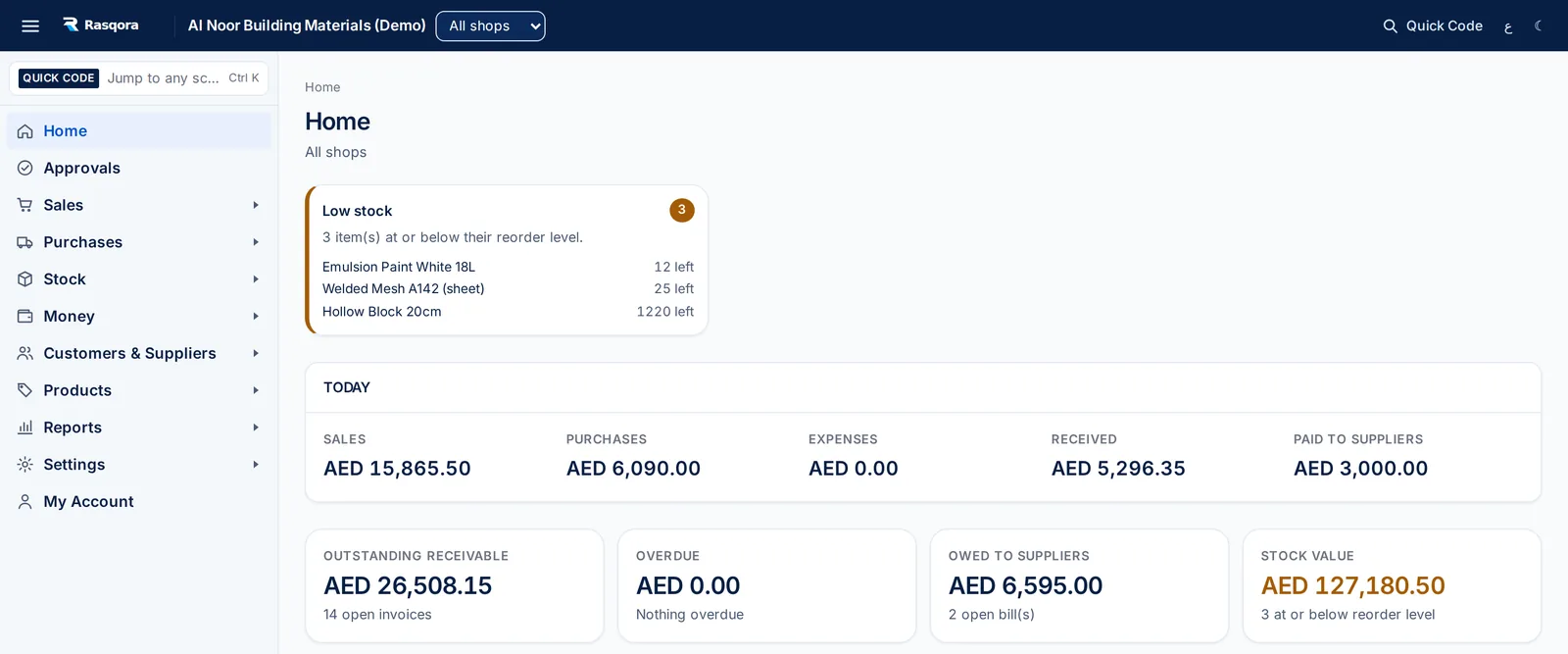
The day at a glanceThe home screen shows today's sales, purchases, expenses, money received and paid, what customers owe, what you owe suppliers, stock value and items running low.
One system for everyday operations
Everything a trading business runs on, connected.
Each area feeds the others: a sale reduces stock and adds to what the customer owes; a supplier payment reduces what you owe and the bank balance.
Sales & invoicing
- Cash sales with change due, and credit sales
- Quotations, sales orders and customer purchase orders
- Bilingual A4 tax invoices and 80 mm receipts
- Payments, returns and credit notes
Purchasing
- Purchase orders with approval and printed LPO
- Goods received against the order
- Supplier bills, supplier payments and returns
- Record a cash or credit purchase in one step
Stock & warehouses
- Stock on hand per warehouse, valued at average cost
- Transfers between warehouses and count adjustments
- Damaged or expired write-offs and recoveries
- Stock history, running-low and out-of-stock lists
Money & accounts
- Cash and bank accounts with cash book and bank book
- Expenses and other income, with receipts attached
- Close the day: cash in, out and closing balance
- Automatic journal entries and chart of accounts
Customers & suppliers
- Credit limits, checked on every credit sale
- Opening balances and running statements
- Who owes us and what we owe, by age
- Salespeople linked to sales
Reports & UAE VAT
- 39 reports, printable as PDF and exportable to CSV
- Sales, purchases, stock, balances and daily summaries
- VAT on sales and purchases, daily and yearly
- Profit & loss, balance sheet and trial balance
Products
- Codes, barcodes, units, categories and brands
- Three price levels (A, B and C) and a minimum price
- Standard, zero-rated, exempt and out-of-scope VAT
- Ready-made product catalog to import from
Team & control
- Users with ready-made and custom roles
- Approval rules for discounts, write-offs and more
- Several shops, branches and warehouses
- Activity log and 2-step sign-in
LiveEverything above is in the current system.
PlannedNot yet available:
- Emailing invoices and statements to customers
- Submitting e-invoices to the FTA through an accredited provider (documents are prepared today)
- Online payment for subscriptions
- Arabic translation of every screen (menus, headings and printed invoices are bilingual today)
- Currencies other than AED
- A dedicated mobile app (Rasqora runs in the phone's browser today)
Sales & invoicing
Make everyday sales easier to manage.
A counter sale takes a few keystrokes: choose the customer, type the item code, enter the quantity, take the cash. Rasqora checks stock, applies the price level and VAT, and works out the change.
- Cash sales to walk-in customers, with change due
- Credit sales checked against the customer's credit limit
- Quotations, printable and convertible to a sale
- Sales orders that reserve stock; customer purchase orders
- Price levels A, B and C, free-of-charge lines and discounts
- Hold a sale and resume it later
- Full or part payments, returns and credit notes
- Keyboard shortcuts: F9 search, Ctrl+S save, Ctrl+P print
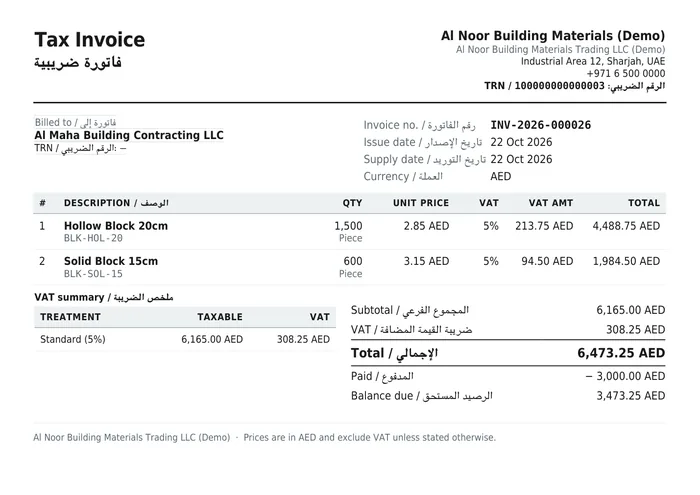
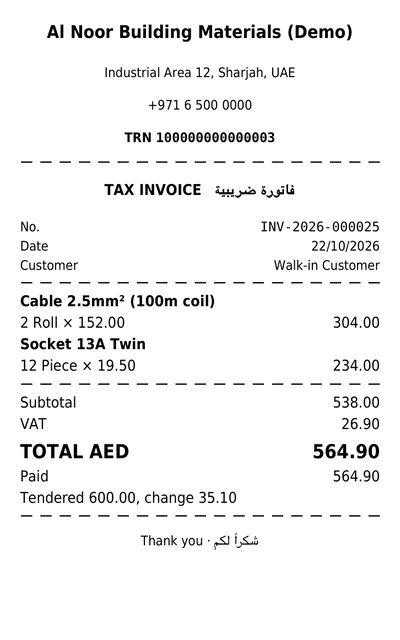
Printed documents: bilingual tax invoice with TRN and VAT summary, and an 80 mm counter receipt.
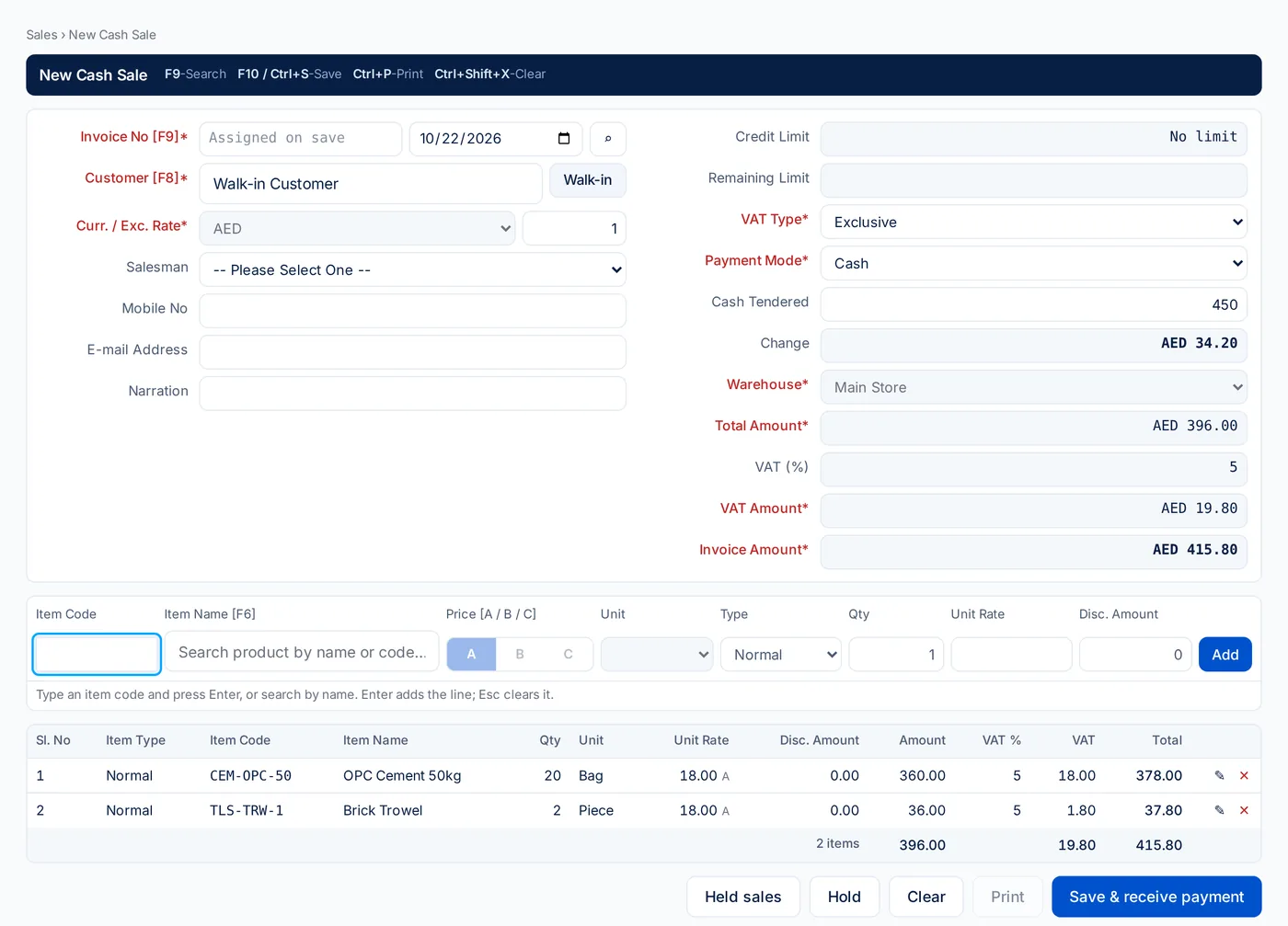
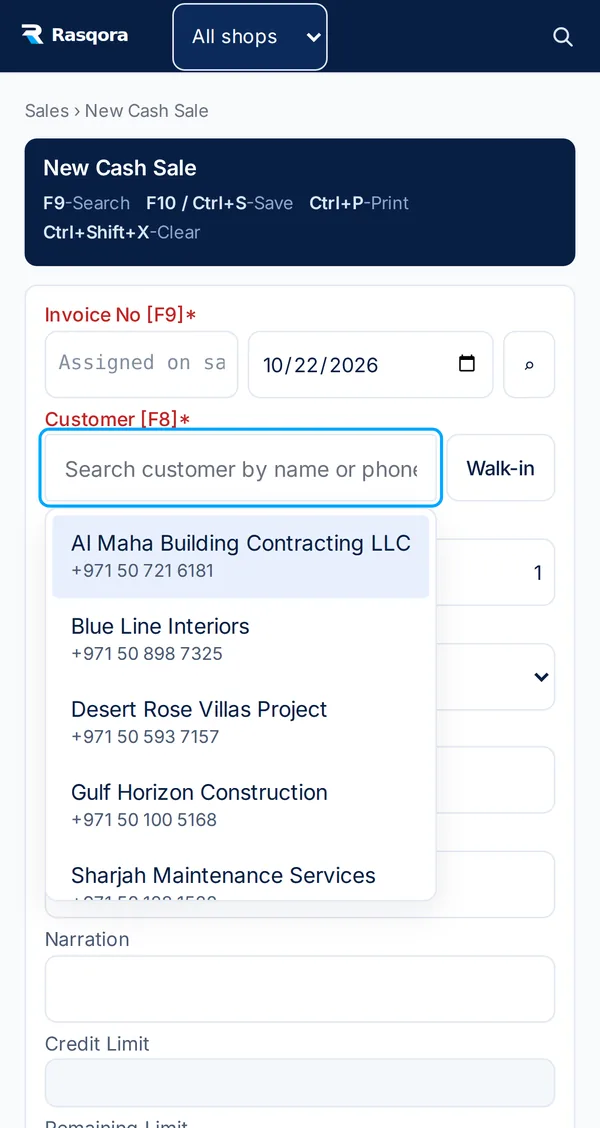
New Cash Sale: item code or search, price level, VAT and change due on one screen.
Purchasing & inventory
Know what you ordered, what arrived and what is on the shelf.
A purchase order follows a clear path — approval, goods received, stock posted — and every step is visible on the order itself.
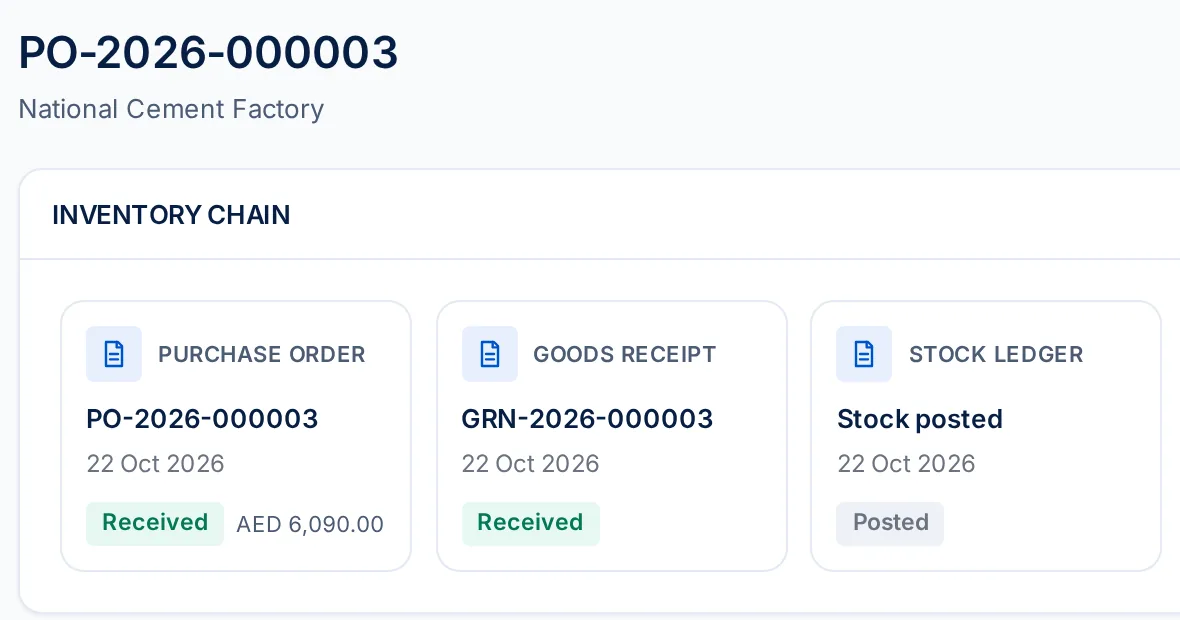
A purchase order with its chain: the order, the goods receipt and the stock it posted.
- Purchase orders: draft, submit, approve, print as LPO
- Goods received against the order, part or full
- Record a cash or credit purchase in one step
- Supplier bills and payments, with what you owe
- Returns to supplier and cash purchase refunds
- Cancel a purchase entered by mistake — stock and bill are reversed together
- Stock per warehouse, valued at weighted average cost
- Transfers between warehouses: approve, dispatch, receive
- Count adjustments with a reason for every change
- Damaged or expired stock written off, and recovered
- Running-low and out-of-stock lists from reorder levels
- Stock reserved by confirmed sales orders
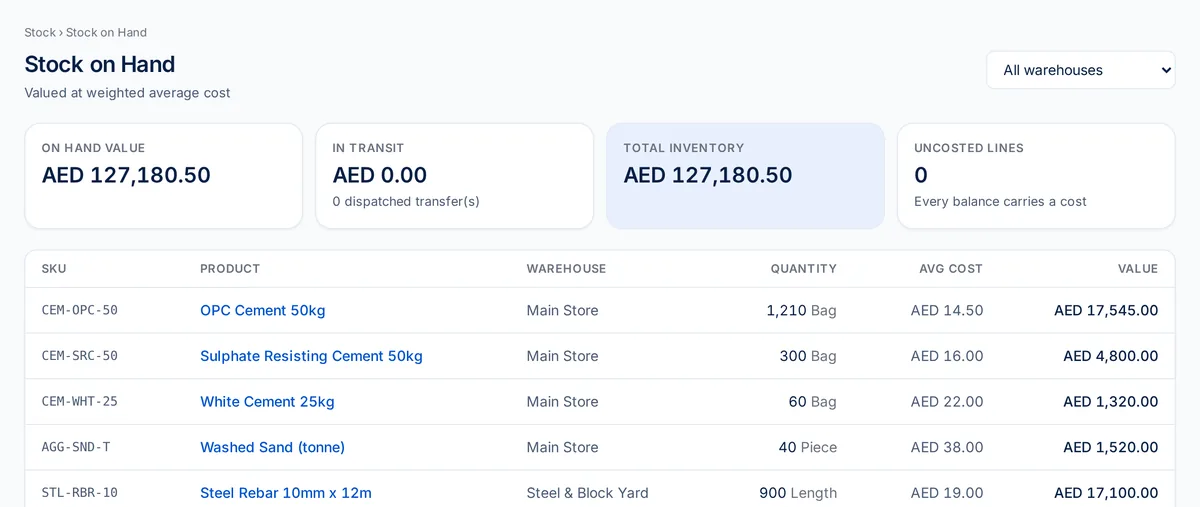
Stock on hand by warehouse, with value at average cost.
Stock moves only through recorded documents — sales, purchases, transfers, adjustments and write-offs — so every quantity on hand can be traced back to the transaction that changed it.
Designed for practical business use
Clear screens for the people who use them every day.
Rasqora is written for shop owners, counter staff and store keepers — not only for accountants. Screens are named after the job they do.
Clear, organized workflows
The menu follows a working day — sell, buy, stock, money — with plain names like "New Cash Sale", "Pay a Supplier" and "Who Owes Us".
Jump to any screen
Press Ctrl K and type a screen name or short code to go straight there.
Each person sees their part
Ten ready-made roles — from cashier to accountant — show each person only the screens their job needs.
English and Arabic
Switch to Arabic with a right-to-left layout. Menus, headings and printed invoices are bilingual today.
Nothing to install
Rasqora runs in a web browser on desktop, and key screens such as a cash sale also work on a phone.
Consistent entry screens
Sales, quotations and purchases share the same layout and keyboard shortcuts.
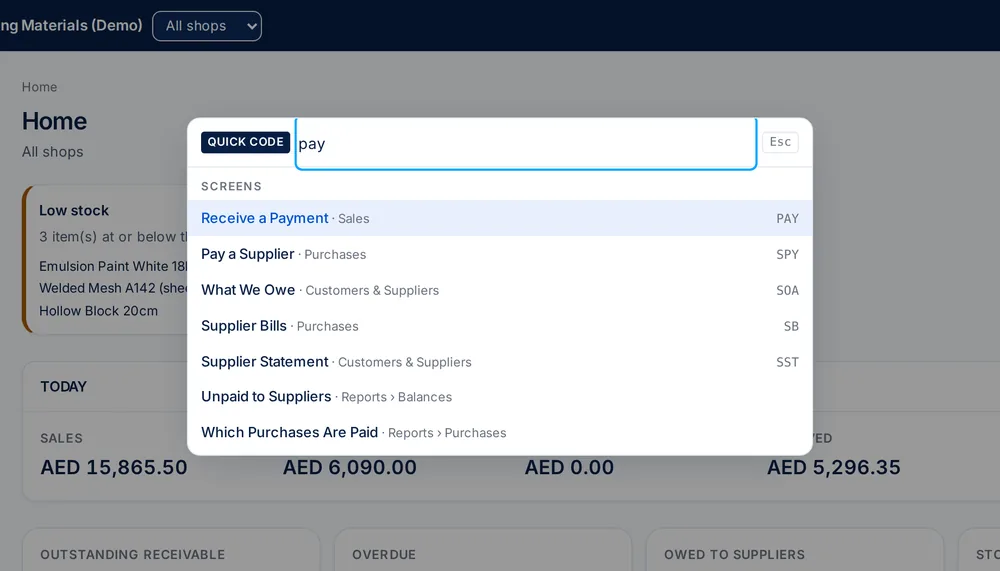
Quick Code: find any screen by name or short code.
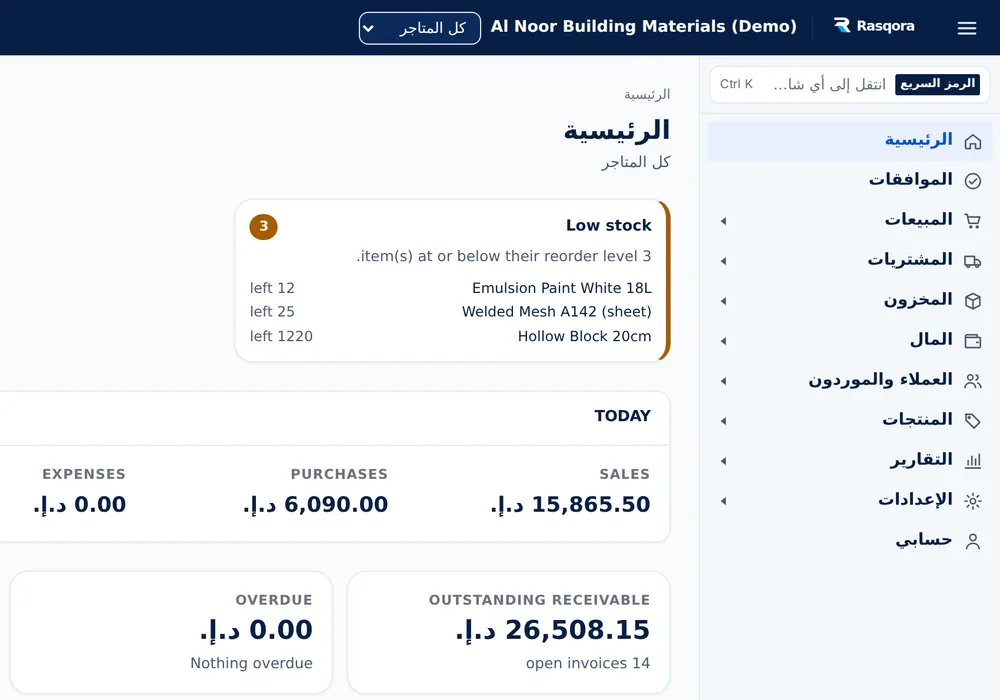
The home screen in Arabic, right to left.
Why Rasqora
A structured foundation for a growing trading business.
A centralized approach
Sales, purchasing, stock, money and reports share one set of records instead of separate files.
Organized workflows
From quotation to payment and from purchase order to supplier payment, each step follows the last.
Built for trading businesses
Price levels, credit limits, warehouses, receipts and UAE VAT are part of the system, not add-ons.
Reports when you need them
39 reports — daily sales, VAT, balances, stock and profit — printable as PDF or exported to a spreadsheet.
Control and accountability
Roles and permissions, approval rules, shop-based access, an activity log and optional 2-step sign-in.
Room to grow
Add shops, branches, warehouses and staff as the business grows, each with the access they need.
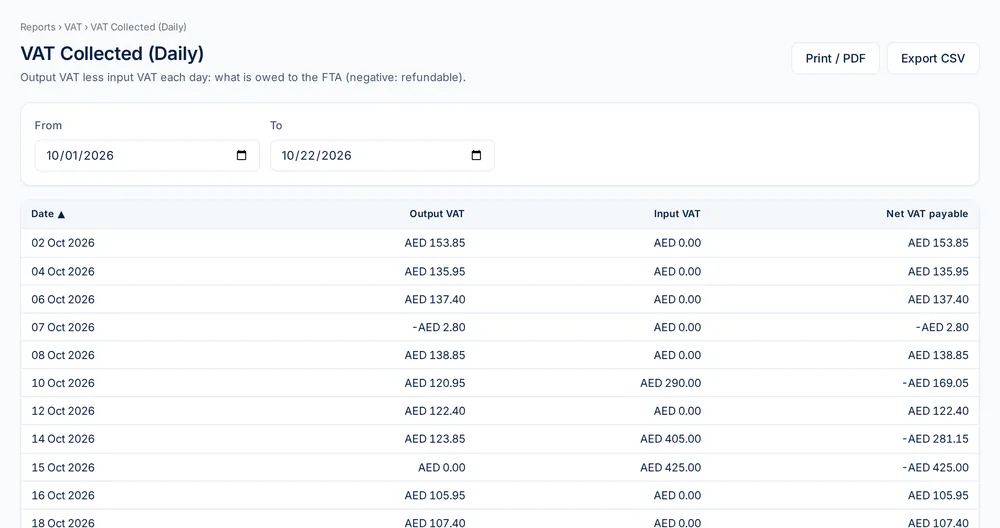
VAT collected, by day.
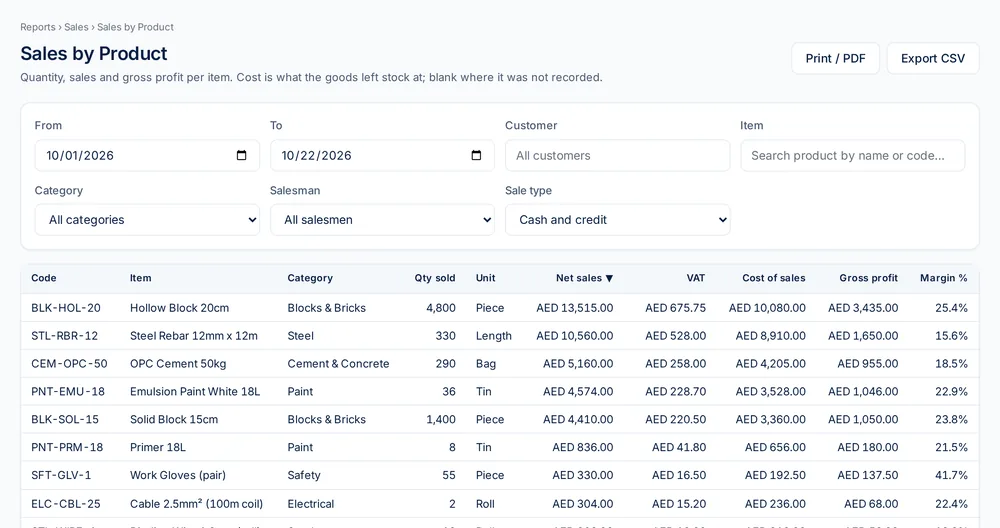
Sales by product.
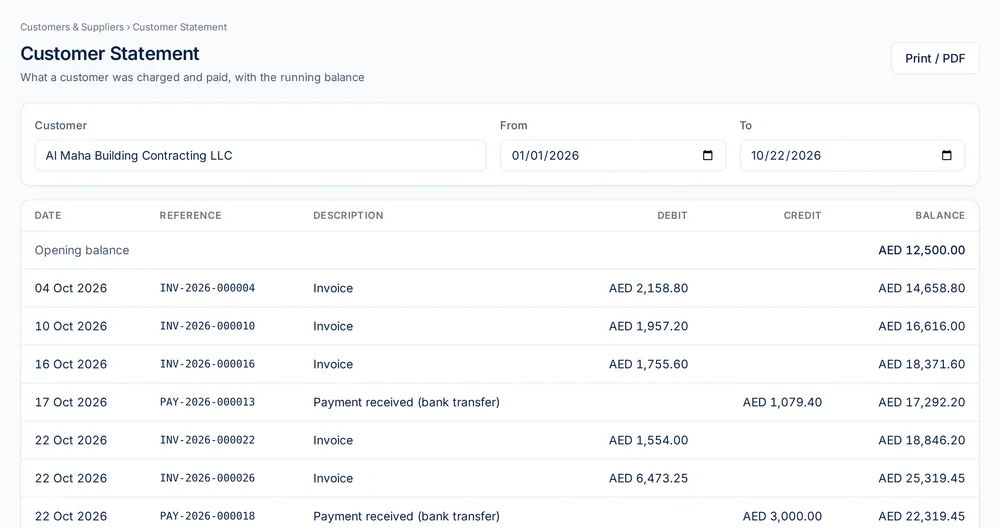
Customer statement with running balance.
Questions
Frequently asked questions
Who is Rasqora ERP for?
Trading, wholesale and retail businesses in the UAE that want sales, purchasing, stock, money and reports in one system.
Does Rasqora handle UAE VAT?
Yes. Products carry standard 5%, zero-rated, exempt or out-of-scope VAT; invoices show your TRN and a VAT summary; and VAT reports cover sales and purchases by day and year. Submitting e-invoices to the FTA is planned and not yet available.
Do I need to install anything?
No. Rasqora runs in a web browser on desktop, and key screens such as a cash sale also work on a phone.
How do I get started?
Request an account at rasqora.com. We review the request and set up your business, then you sign in with the email and password you chose.
Bring More Clarity to Your Business with Rasqora ERP.
Sales, purchasing, stock, money and reports in one organized system — every transaction recorded once and visible everywhere it matters.
Request an account
Fill in the short form with your business and contact details.
We review and set you up
Once approved, your business, owner account and plan are created for you.
Sign in and start selling
Sign in with the email and password you chose in your request.